8 min
8 min 
I’ve spent the last 5+ years working closely with WooCommerce stores. During that time, I’ve tested over 24 WooCommerce review plugins and helped more than 400+ store owners improve how they collect and display customer reviews.
I’ve worked with stores ranging from new launches to high-volume WooCommerce sites handling tens of thousands of orders each month.
Through this work, I’ve analyzed more than 2 million customer reviews and thousands of automated review request campaigns.
It’s safe to say I’ve tested most WooCommerce review plugins available today.
I’ve seen which ones increase review rates, which ones slow down stores, and which ones start to break as traffic and order volume grow.
In this guide, I break down the best WooCommerce review plugins for 2026 based on real store usage, performance, and results, not feature lists or marketing claims.
This isn’t a sponsored post or a generic roundup. Every plugin listed here was tested on real WooCommerce stores.
I break down what each plugin is good at, its real limitations, and which type of WooCommerce store should use it.
Quick Overview: WooCommerce Review Plugins
| Plugins | Best For | Key Strength | Watch-outs | Pricing |
|---|---|---|---|---|
| WiserReview | Growing & serious WooCommerce stores | Automated review collection, AI moderation, high-converting widgets | The free plan is limited for scaling stores | Free plan available. Paid plans start at $9/month, AI plan at $19/month. |
| CusRev | Small stores on a budget | Free review reminders & verified reviews | Dated UI, weak integrations, scaling issues | Free basic plugin. Professional plan starts at $7.99/month (billed monthly or annually). |
| ReviewX | Entry-level review setup | Multi-criteria & photo reviews | Stability, performance & support issues | Paid plans start at $47/year. Agency plans go up to $239. |
| Product Reviews Pro | WooCommerce-only workflows | Stable core features | High vendor lock-in, slow development | $79/year for a 1-site license. No free or monthly plan. |
| Smash Balloon | Social proof from external platforms | Visual Google & social reviews | Performance impact, API dependency | Starts at $49/year. Higher tiers go up to $299/year. |
Our Review Methodology (How We Chose These Five Plugins)
)
I didn’t just skim feature lists.
Each WooCommerce review plugin was tested using the same framework across multiple live WooCommerce stores.
Here’s exactly what I evaluated:
1. Review Collection
- How easy is it to collect customer reviews?
- Does the plugin support review request emails and review reminder emails?
- Can you send automated review requests after purchase?
If a plugin can’t reliably generate new reviews for WooCommerce, it doesn’t belong on this list.
2. Review Display & UX
- How are reviews displayed on product pages?
- Can you show recent reviews, most helpful reviews, and review counts?
- Are star ratings visible above the fold?
Displaying reviews correctly matters as much as collecting them.
3. Review Types & Depth
I prioritized plugins that support:
- Photo reviews
- Video reviews
- Multi-criteria reviews (quality, value, shipping, etc.)
- Review titles and detailed written reviews
Shallow reviews don’t build trust. Detailed reviews do.
4. Import & Existing Review Data
- Can you import existing reviews?
- Does it support importing Google reviews or previous reviews from other platforms?
- How well does it handle existing review data?
Switching tools shouldn’t mean losing years of customer feedback.
5. Performance & Reliability
- Does it slow down the WooCommerce store?
- Are updates frequent and stable?
- Does it work well with popular themes and page builders?
6. Pricing & Value
- Is the free version usable?
- Is the premium version worth the upgrade?
- Does pricing scale reasonably for growing stores?
Only five plugins passed all criteria.
5 Best WooCommerce Review Plugins
Here are the five best WooCommerce review plugins for 2026, selected based on real-world testing, performance, reliability, and how well they help stores collect, manage, and display reviews at scale.
1. WiserReview – Best WooCommerce Review Plugin

WiserReview is the best WooCommerce review plugin I tested.
Not because it has the longest feature list, but because it actually addresses the biggest bottleneck most WooCommerce store owners face: consistently collecting reviews and turning them into revenue-driving assets.
Most review plugins help you add reviews. WiserReview helps you build a repeatable review system.
Collect Reviews Automatically via Email, SMS & WhatsApp

WiserReview automatically sends review request emails, SMS, or WhatsApp messages after purchase.
Customers can leave reviews in just a few clicks, consistently driving more reviews without manual follow-ups and making it easier for shoppers to post reviews after purchase.
Built-In Incentives (Without Breaking Trust)

You can incentivize reviews by offering coupon codes to verified customers.
This boosts review counts while still collecting honest customer feedback, no fake reviews involved.
Manage, Tag & Repurpose Reviews From One Dashboard

All reviews are managed from a single dashboard where you can tag, group, translate, and reply using AI.
This turns reviews into reusable marketing assets instead of static content.
Smart Review Moderation & AI Controls

Low-rated or flagged reviews can be auto-held while AI assists with moderation decisions.
This protects your brand and keeps reviews authentic, because perfect five-star profiles don’t convert.
High-Converting Review Widgets (Built for WooCommerce)

WiserReview offers fast, native-looking widgets like star ratings, Wall of Love, and Q&A blocks.
They surface the most helpful reviews on product pages to improve engagement and conversions.
Not just that, WiserReview also displays rich review snippets and displays reviews on Google Shopping.
AI-Powered Review Management (Collect, Moderate & Showcase With Ease)

WiserReview automates the entire review workflow using AI.
Positive reviews are published instantly, while negative reviews are paused for review, so you stay in control without slowing review growth.
Import Existing Reviews (Without Losing Data)

You can import existing reviews from WooCommerce or other tools without losing star ratings.
Your existing social proof stays intact when switching plugins.
WiserReview Pricing




All your reviews in one place
Collect reviews, manage every response, and display them where they matter most.
2. Customer reviews for WooCommerce (CusRev)

Customer reviews for WooCommerce (CusRev) is one of the most widely used plugins for handling reviews for WooCommerce stores.
It’s been around for years, and it shows.
Enabling Reviews in WooCommerce Using CusRev

Customer reviews for WooCommerce (CusRev) extend the default WooCommerce review system rather than replacing it.
This keeps things simple, but also means you inherit WooCommerce’s limitations around layout, UX, and scalability.
CusRev Review Display & Visual Settings

CusRev relies heavily on WooCommerce’s default styling, offering limited visual flexibility.
You can switch between basic and enhanced UI, but deeper customization requires workarounds or custom CSS.
CusRev Review Widget Example (Frontend View)
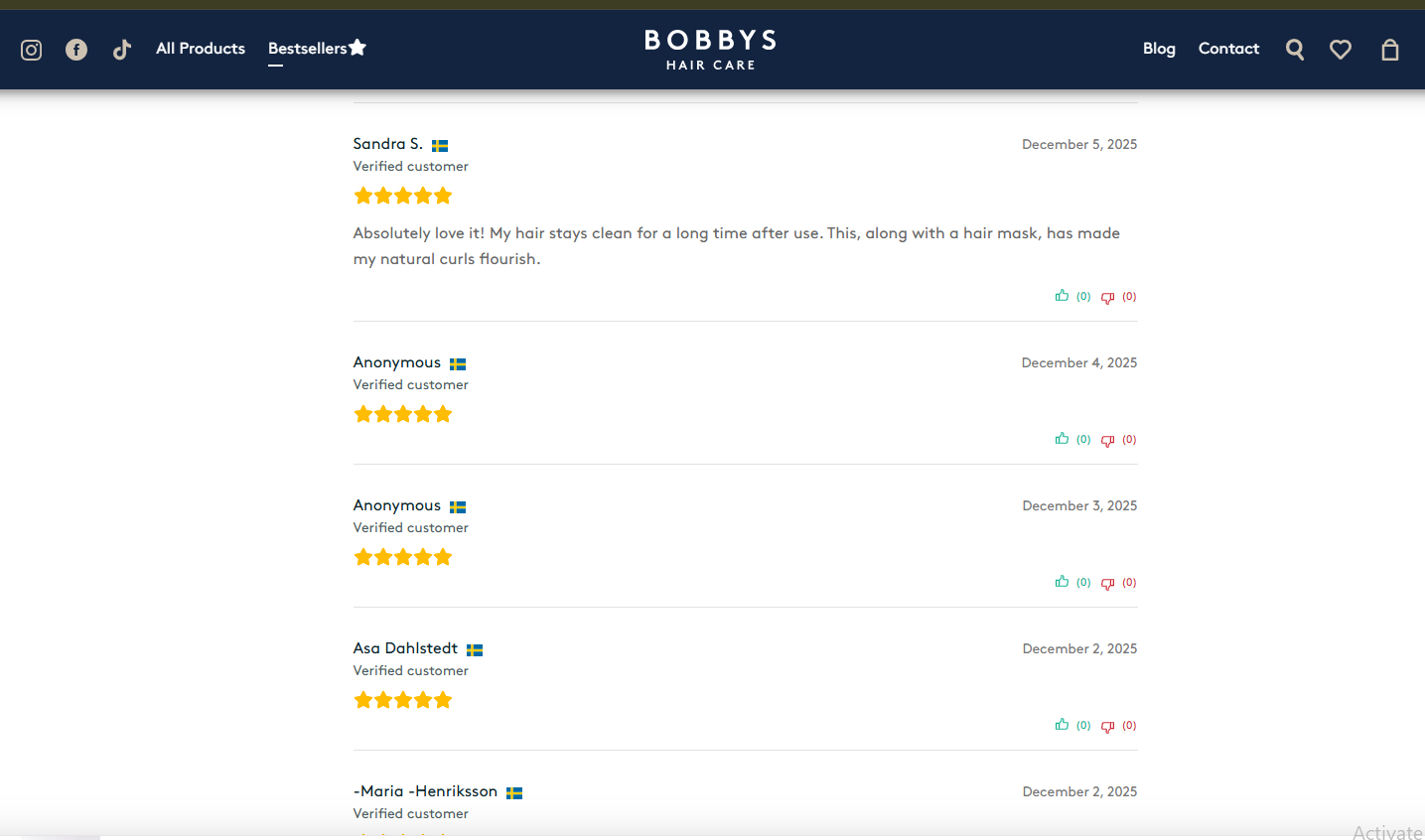
CusRev displays clean, readable product reviews with verified badges and star ratings.
The layout is functional, but feels dated compared to modern, conversion-focused review widgets.
CusRev Limitations
CusRev is powerful for a free WooCommerce reviews plugin, but limitations show as stores scale.
Consent complexity, branding, weak integrations, media-driven database bloat, and a basic UI make it harder to use for polished, automated review marketing.
CusRev Pricing

3. ReviewX

ReviewX is a WooCommerce review plugin that focuses on basic automation, photo reviews, and multi-criteria ratings.
On the surface, it covers the essentials, but in real-world use, stability, performance, and support issues make it a risky choice for stores that need reliable, long-term review management.
Branding & Review Layout Customization

You can set brand colors and choose between list, grid, or masonry layouts.
Customization is basic, and advanced styling often requires additional tweaks or troubleshooting.
Multiple Review Criteria

ReviewX lets customers rate products across multiple criteria, such as price and quality.
While useful in theory, this feature can introduce UI and JavaScript conflicts depending on the theme and WooCommerce setup.
Visual Review Feature
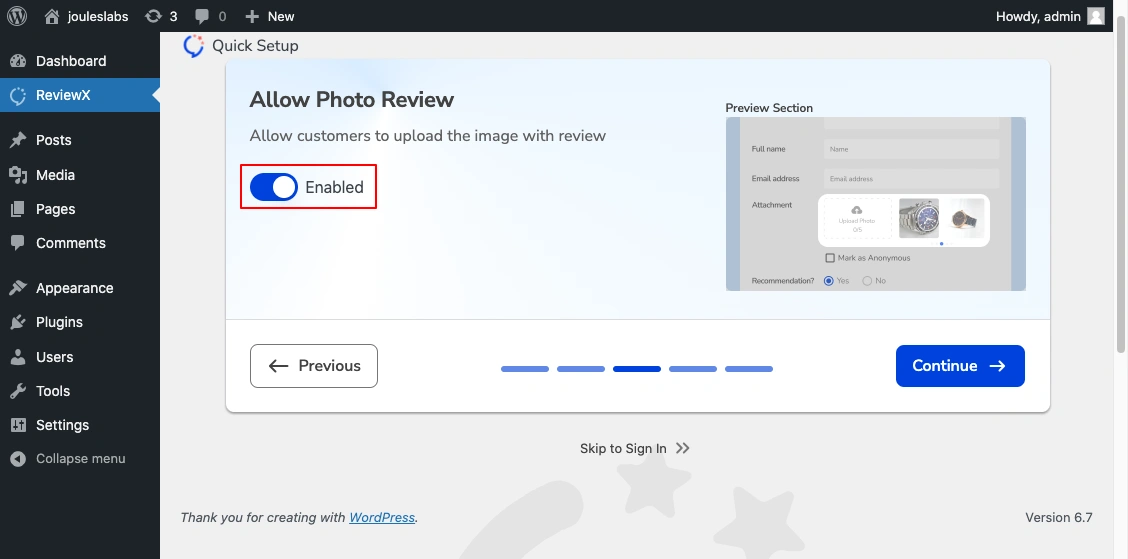
ReviewX supports photo reviews, allowing customers to upload images with their feedback.
In practice, users often report broken image imports and media-related issues, especially with AliExpress products.
ReviewX Frontend Review Display

ReviewX displays star ratings, summaries, and breakdowns of criteria on product pages.
However, performance overhead and inconsistent rendering are common complaints in larger stores.
ReviewX Pricing

All your reviews in one place
Collect reviews, manage every response, and display them where they matter most.
4. Product Reviews Pro

Product Reviews Pro for WooCommerce is a premium customer review plugin that extends WooCommerce’s native review system with features such as review voting, Q&A, and media uploads.
While it’s stable and functional, slow development, limited integrations, and high vendor lock-in make it less flexible for stores that need modern, scalable review management.
Setup & Configuration Experience
Initial setup is straightforward for WooCommerce users.
That said, development has slowed since the GoDaddy acquisition, and the plugin shows little evolution beyond core features.
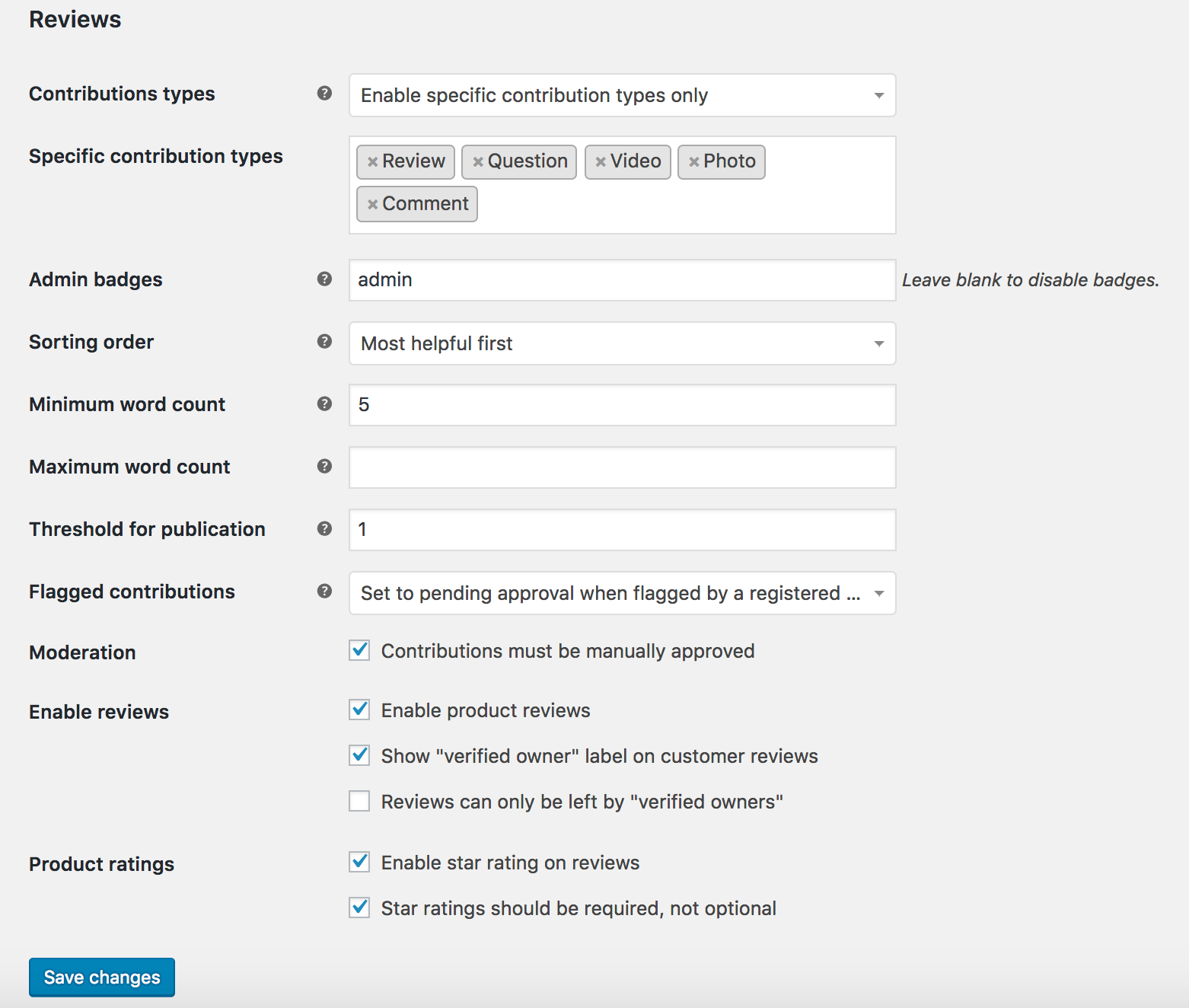
Additional Comment & Review Settings

Product Reviews Pro extends WooCommerce’s native comment system with additional controls, including threaded reviews and sorting.
While flexible, it still relies heavily on core WordPress comments, which limits scalability and modern review workflows.
Review Form & Contribution Types

The plugin supports multiple contribution types, including reviews, questions, photos, and videos.
However, the review form UX feels dated and lacks the streamlined, mobile-first experience modern shoppers expect.
Frontend Review Display (Widget Example)

Reviews display cleanly on product pages with ratings, summaries, and criteria.
The presentation is functional, but customization options are limited without custom development.
5. Smash Balloon

Smash Balloon is a social review plugin that displays external site reviews from platforms such as Google and Facebook.
All Feeds Dashboard (Create New Feed)
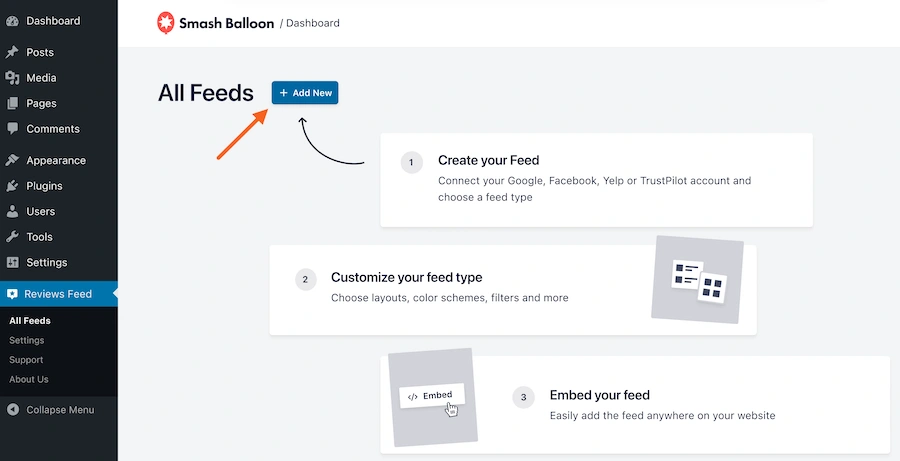
Smash Balloon uses a feed-based system where each review display is created as a separate feed.
This approach is flexible, but it adds extra setup steps and loads global CSS and JavaScript site-wide.
Add Review Source

To create a review feed, first add an external source such as Google reviews, Facebook, Yelp, or TripAdvisor.
Smash Balloon does not collect native WooCommerce product reviews; all reviews are sourced from third-party APIs.
Select Review Source Type

Your license tier limits source selection; some platforms are available only with higher plans.
If an API connection breaks or rate limits change, review feeds can stop updating without warning.
Choose Feed Template
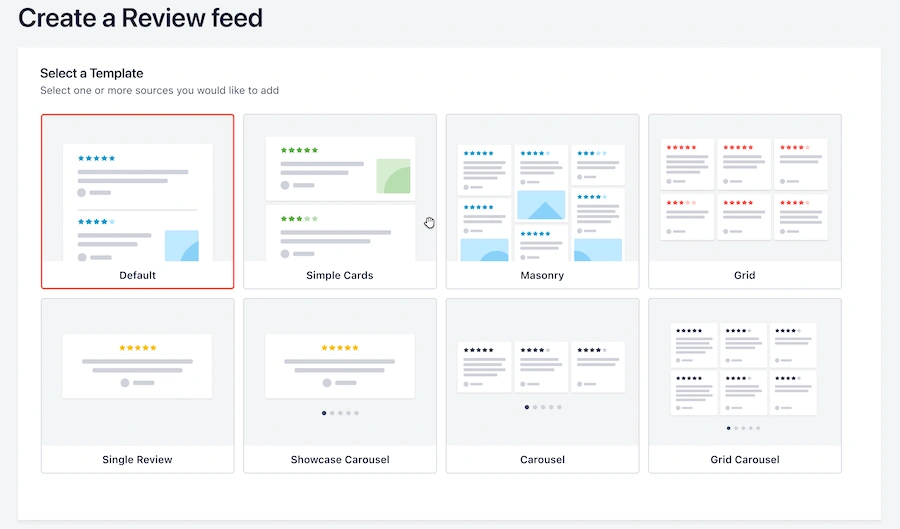
Smash Balloon offers multiple review sections, templates, including cards, masonry, grids, and carousels.
While visually polished, these templates can introduce performance overhead on product and landing pages.
Feed Customization & Embed Option
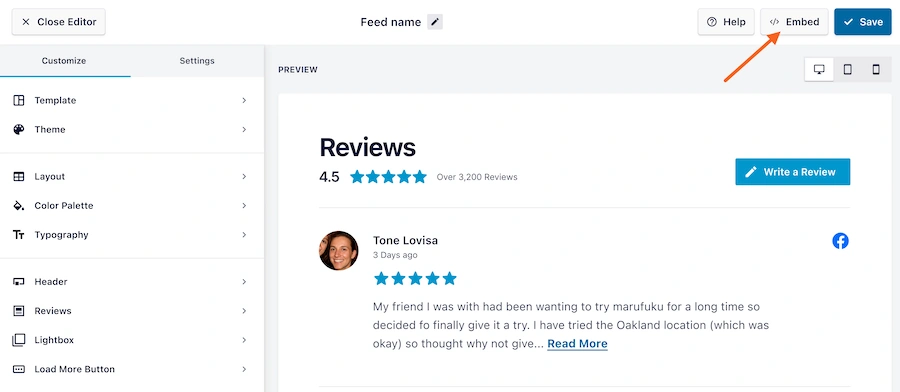
You can customize colors, layout, typography, and filtering before embedding the feed.
Despite the UI polish, users report unpredictable behavior after updates and conflicts with caching plugins.
Display Reviews Using Shortcodes

Feeds are displayed using shortcodes added to pages, posts, or widgets.
This works reliably for static pages, but dynamic WooCommerce product pages may require extra handling.
Smash Balloon Pricing

How to Choose the Right WooCommerce Review Plugin

Choosing a WooCommerce review plugin isn’t about finding the one with the longest feature list.
It’s about finding a plugin that fits how your store actually operates today, and won’t break as you scale tomorrow.
Here’s the framework I use when evaluating review plugins for real WooCommerce stores.
1. Start With How You’ll Collect Reviews
The biggest difference between average and high-performing stores is review velocity.
Ask yourself:
- Can the plugin send automated review request emails?
- Does it support review reminder emails?
- Can customers leave reviews in just a few clicks?
If a plugin relies on manual review collection, it will fail over the long term, no matter how good the display looks.
2. Check What Types of Reviews You Can Collect
Modern shoppers trust detailed reviews, not one-line star ratings.
A good WooCommerce review plugin should support:
- Written reviews with review titles
- Photo reviews (and ideally video reviews)
- Multi-criteria reviews (quality, value, delivery, etc.)
If all you can collect is a star rating and a short comment, you’re leaving customer feedback and conversions on the table.
3. Evaluate How Reviews Are Displayed on Product Pages
Reviews only help if shoppers actually see them.
Look for plugins that can:
- Display reviews directly on product pages
- Show star ratings near the product title
- Highlight most helpful reviews, not just recent ones
- Surface average rating and review counts clearly
Avoid plugins that rely only on shortcodes or static blocks without WooCommerce context.
4. Think About Moderation & Trust Signals
Not all reviews should be published instantly.
Strong customer review management includes:
- Manual or AI-based moderation
- Controls for negative reviews
- Verified reviews tied to real purchases
- Protection against fake reviews
Ironically, a few authentic negative reviews often increase trust; total control or zero moderation does not.
5. Consider Importing & Existing Review Data
If your store already has reviews, switching plugins shouldn’t delete them.
Before choosing, confirm:
- Can you import existing WooCommerce reviews?
- Can you migrate previous reviews from another plugin?
- Will star ratings and review history remain intact?
Losing existing review data is one of the most expensive mistakes store owners make.
6. Watch Performance & Plugin Conflicts
Many review plugins appear fine at first, but can quietly slow your site.
Pay attention to:
- Site-wide CSS and JavaScript loading
- Whether media-heavy reviews cause database bloat
- Conflicts with caching, optimization, or themes
A good WooCommerce review plugin should feel invisible from a performance standpoint.
7. Pricing Should Scale With Your Store
Free versions are great for testing, but they rarely provide enough to drive growth.
When evaluating pricing:
- Check what’s locked behind the premium version
- Avoid plugins with high vendor lock-in
- Be cautious of annual-only pricing with slow development
You’re not just buying features, you’re buying long-term reliability.

All your reviews in one place
Collect reviews, manage every response, and display them where they matter most.
Start Free →Wrap up
After testing 24 WooCommerce review plugins across real stores, one thing became clear:
Most plugins help you add reviews. Very few help you build a reliable review system.
If you’re starting, simpler plugins may be enough to get reviews flowing. But as your store grows, limitations around automation, performance, integrations, and data control become costly.
That’s where the difference shows.
For stores seeking consistent review collection, a clean display, strong moderation, and long-term scalability, WiserReview is the best WooCommerce review plugin for 2026.
Reviews aren’t just social proof anymore. They’re a growth lever.
Choosing the right system for reviews for WooCommerce can directly impact trust, conversions, and long-term growth.
Frequently asked questions
If your store is growing and you need consistent review collection, moderation, and scalability, WiserReview is the best choice. It goes beyond basic reviews by automating review requests (email, SMS, WhatsApp), managing reviews with AI, and turning reviews into conversion-focused assets, something most plugins struggle to do at scale.
Yes, but not all plugins handle this well. WiserReview allows you to import existing WooCommerce reviews (and reviews from other tools) without losing star ratings or history. Many plugins either lack proper import tools or create vendor lock-in, making switching risky once you’ve collected reviews.
Free plugins like CusRev can work for small or early-stage stores, but they often hit limits as you scale, dated UI, weak integrations, limited automation, and performance issues. If reviews are important to your conversions, a paid plugin with automation and moderation quickly becomes worth the upgrade.
Some do. Plugins that load CSS and JavaScript site-wide or rely heavily on third-party APIs (like Smash Balloon) can negatively impact performance. During testing, performance and reliability were major differentiators, and plugins that added noticeable overhead didn’t make the final cut.
Both, but review collection comes first. Without automated review requests, reminders, and low-friction submission, most stores never reach enough reviews to build trust. The best plugins combine strong review velocity with high-visibility display, ensuring reviews are both collected and actually seen by shoppers.

Krunal