7 min
7 min 
Most people buy testimonial software based on a flashy demo or a shallow blog post written by someone who has never touched the product.
You end up wasting time, money, and the valuable social proof you need to increase conversions.
I spent over 50 hours reviewing the top 25 testimonial software platforms on the market.
My goal was to find tools that look good and also solve the core problem: collecting authentic video testimonials and text reviews, then displaying them where they matter most.
Forget the long list of features most reviews give you.
This guide cuts through the noise to show you the 9 best testimonial collection software tools you should invest in right now and how to use them to build trust.
Let’s dive in.
Quick overview: Testimonial collection tools
| Tools | Standout Feature | Starting Price | Video Support |
|---|---|---|---|
| WiserReview | Text, photo, and video reviews + Google sync | Starts at $9/mo. Free plan available. | Yes |
| Senja | Unlimited testimonial collection + 25+ platform autosync | Starts at $19/mo. Free plan available. | Yes |
| UseTrust | Built-in Video Studio with editing + subtitles | Around $35–$40/mo. Free plan available. | Yes |
| StoryPrompt | AI-powered personalized video request flows | Free plan available. Paid plans from $49 to $199 per month. | Yes |
| ReviewFlowz | Multi-platform review aggregation + Slack alerts | Starts at $29/mo. Free plan available. | No |
| SimpleTestimonial | One-click HD video downloads + mobile recording | Starts at $37/mo. Free trial available. | Yes |
| VocalVideo | 1080p recording + pro editing suite | $99–$129/mo billed annually. No free plan or free trial. | Yes |
| MakeUGC | AI-generated UGC videos with brand kit | Starts at $39/mo, higher tiers available. No free plan. | Yes |
| Famewall | AI Composer + import from 30+ review platforms | Starts at $9.99/mo. Free plan available. | Yes (5-min limit) |
Our review methodology (How we chose these nine tools)

I didn’t pick these tools based on hype or affiliate payouts. I tested them, reviewed real user feedback, and evaluated their performance in day-to-day use.
This is the simple framework I used:
1. Feature Set
Any viable testimonial collection software must do three things well:
- Collect: Effortlessly collect text, photo, and especially video testimonials via a simple, shareable link. No clunky signups for the customer.
- Manage: Give you an easy way to manage testimonials, moderate submissions, filter by tags, and turn them into shareable images or videos.
- Display: Provide clean, fast, and highly customizable widgets (e.g., a testimonial widget) that won’t compromise your page speed or clash with your brand style.
2. Ease of Use
We prioritized platforms that make it easy for customers to submit video testimonials and for your team to quickly set up and embed the widgets.
This reduces friction in the customer feedback loop.
3. Value for Money
The pricing models in this space are inconsistent. Many tools hook you with a free plan but then charge outrageous fees for video hosting, more than one “Wall of Love” page, or simply for removing their tiny brand logo.
We focused on tools that offer unlimited testimonials or a very generous allowance on their starter paid plans.
4. User Ratings
As an author, I know anyone can write a strong sales page.
I pored over actual user ratings on G2, Capterra, ProductHunt, and Trustpilot to see what real, paying customers, especially those running agencies or e-commerce stores, were saying about the platform’s reliability and support.
5. Support & Integrations
If you can’t connect your testimonial tool with your existing systems (store builder, email marketing, or Zapier), it becomes another silo.
The best tools offer seamless integrations to automate post-sale requests or integrate with your landing pages.
9 Best testimonial tools to collect social proof
In this section, we break down each top testimonial tool and explain why it earned its spot.
1. WiserReview
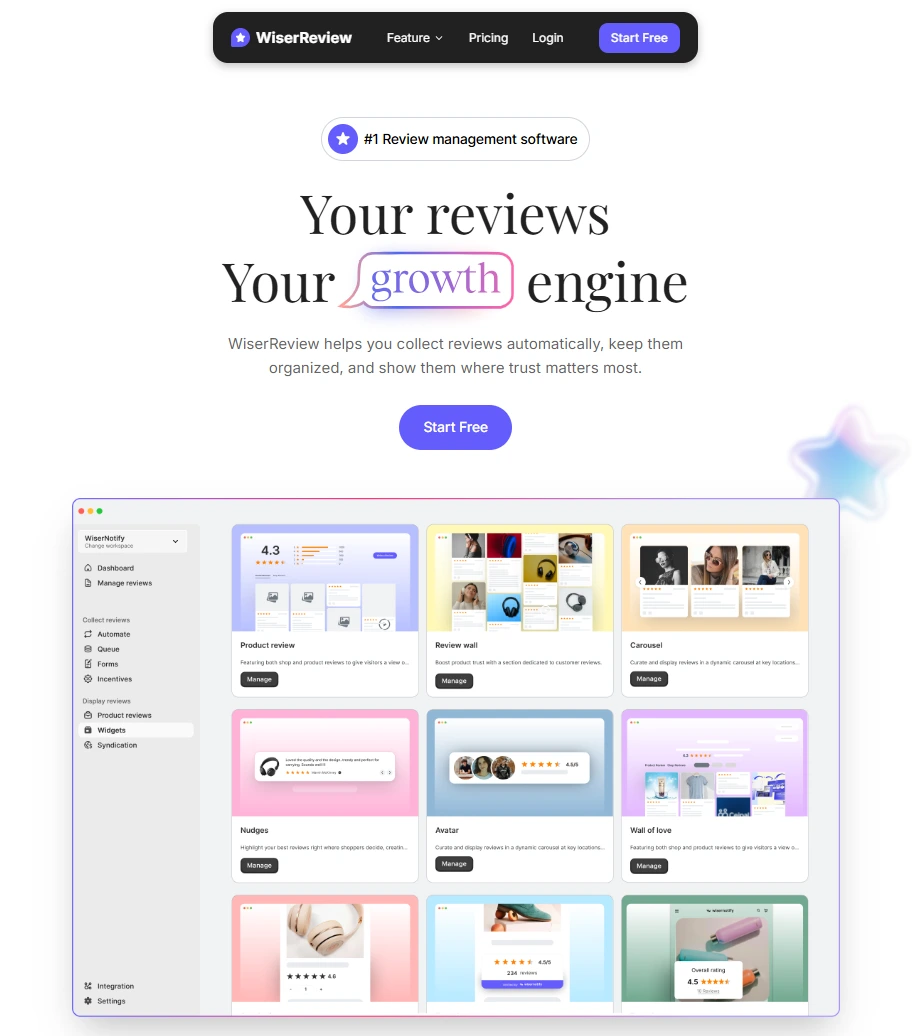
WiserReview works like a full review management platform but is priced for small to midsize businesses.
It doesn’t charge high fees to collect video testimonials and offers what the bigger, clunkier players lock behind expensive tiers.
If you need a single tool to handle text, photo, and video reviews across multiple sources without a heavy price tag, this is your answer.
WiserReview testimonial collection

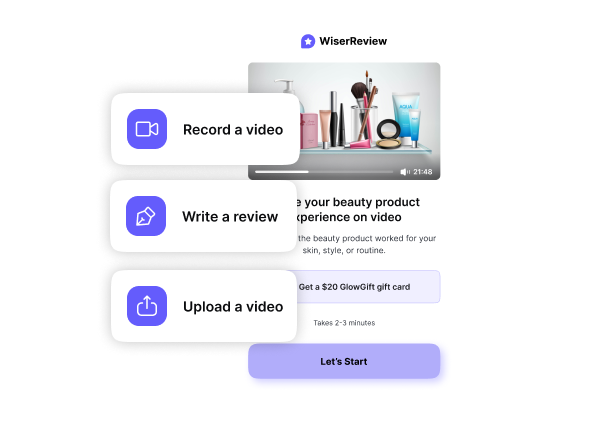
WiserReview’s main strength is its flexibility in collecting customer feedback. You can send out branded links via email, SMS, or even WhatsApp.
For e-commerce, it offers post-purchase automation to trigger requests at the right time.
The form is clean and focused, making it effortless for satisfied customers to submit either a written review or a short video testimonial.
It also lets you easily import testimonials from Google, Facebook, and other review platforms.
Here is the WiserReview review collection form:
WiserReview testimonial management

The dashboard is clean. You can easily approve or deny submissions and add internal notes.
The key feature is the ability to edit minor errors or add missing details to a text review (with customer consent, of course).
It also gives you smart filters to quickly find a specific testimonial by star rating, source, or custom tags, which is crucial for agencies managing multiple client campaigns.
Moderation is simple. It lets you approve or reject submissions and tag them to stay organized.
WiserReview testimonial display
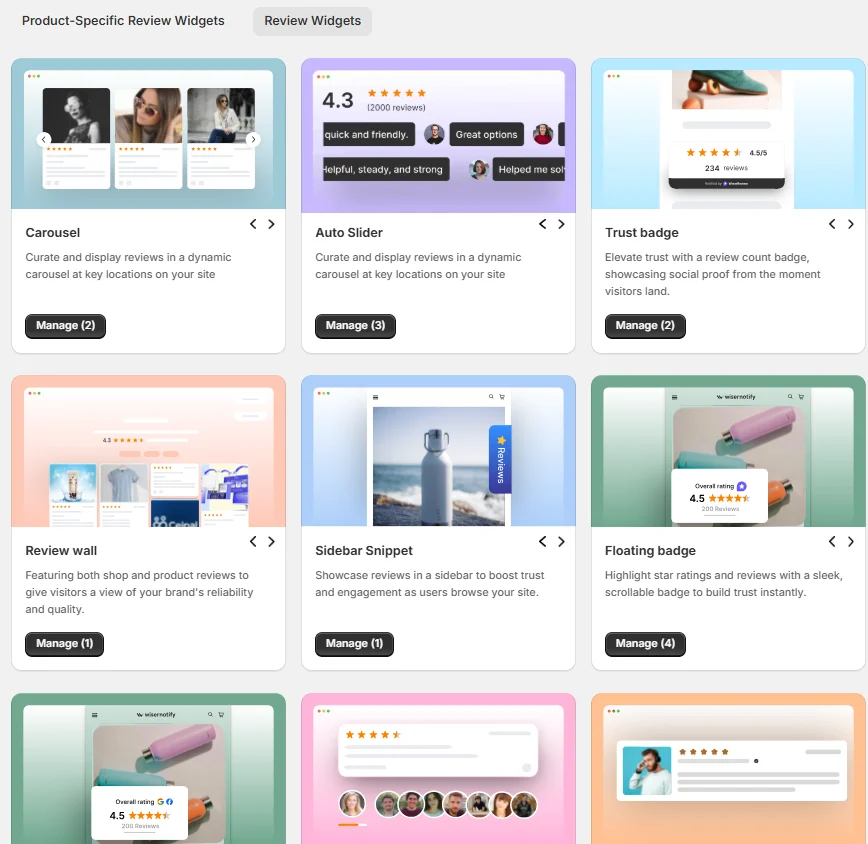
You get more than a dozen ways to display testimonials, including sleek, fast-loading carousels, pop-ups, and floating badges.
The widgets are mobile-friendly and do not hurt your site speed. You can also create a dedicated testimonial hero section or an embeddable wall-of-love page.
The level of customization options for matching your brand style is superior to many competitors at this price point.
Here is a real-time Wall of Love:
WiserReview pricing overview
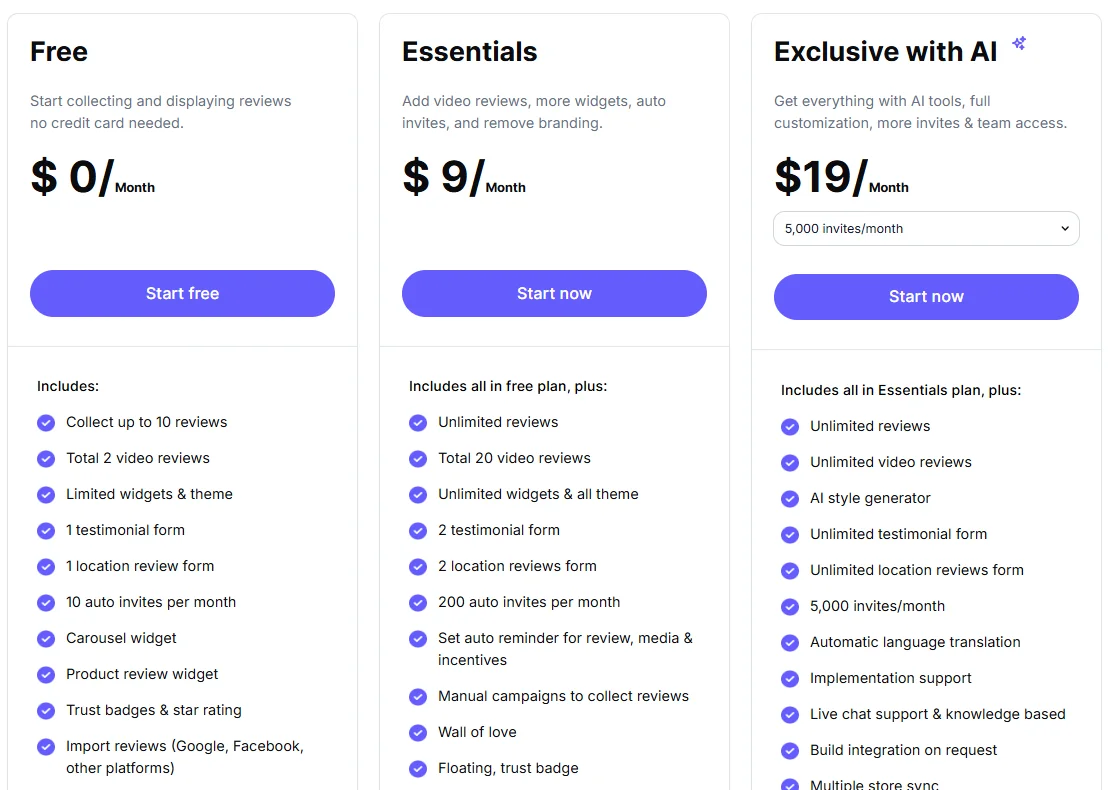
WiserReview real user feedback



All your testimonial in one place
Collect testimonial, manage every response, and display them where they matter most.
2. Senja

Senja focuses on simplicity and clean design. It’s the perfect testimonial tool for creators, freelancers, and small SaaS companies who need beautiful, professional social proof fast.
Its ease of use for collecting and sharing testimonials on social media and landing pages is top-tier.
Senja testimonial collection
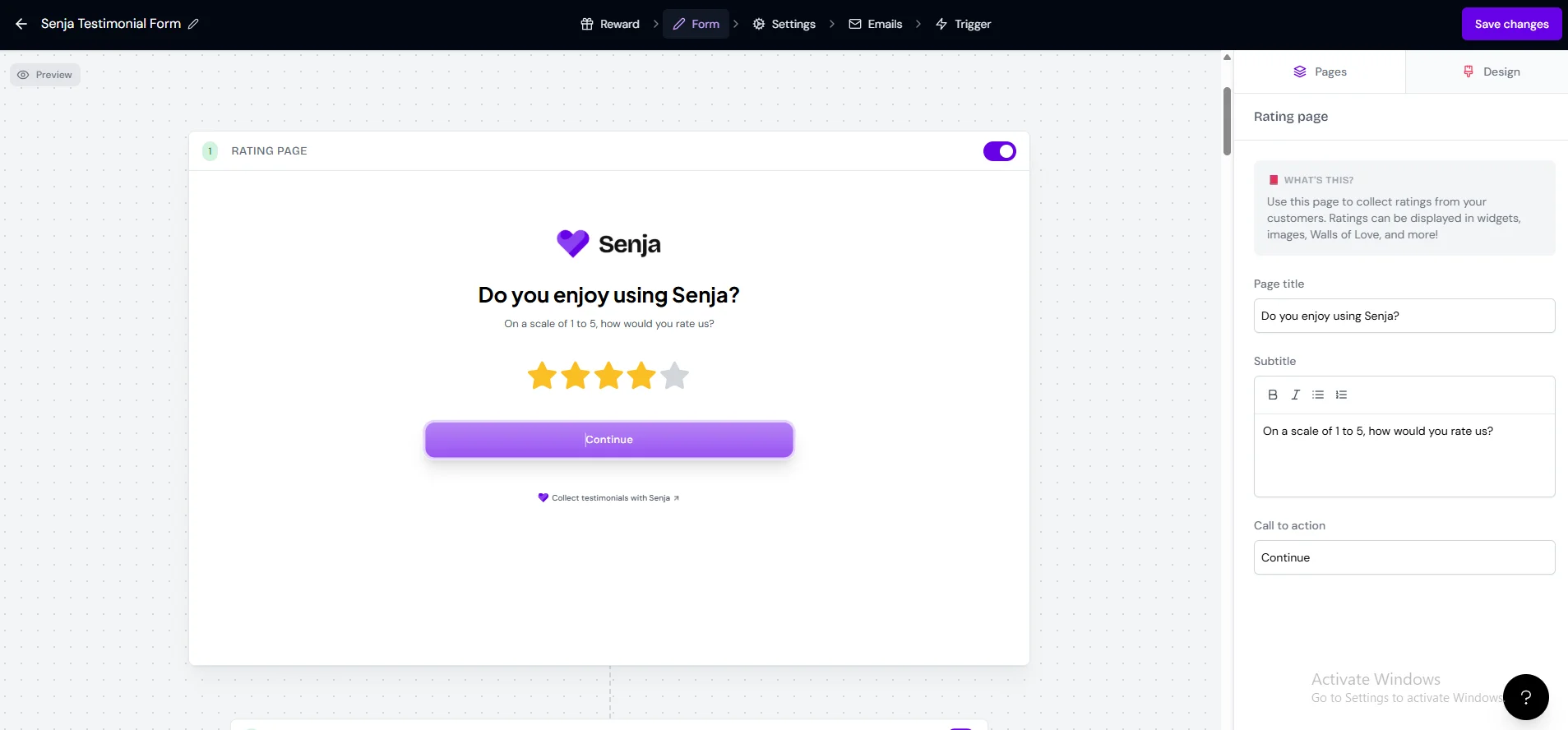
Senja makes the testimonial collection process painless. You send a link; the customer can record a short video or type a text review instantly.
It starts with a rating page that segments users and makes sure you ask your most satisfied customers for a full testimonial.
It also includes an excellent feature that automatically finds and imports testimonials from Twitter, LinkedIn, and even G2, turning existing social channel testimonials into fresh content.
Senja testimonial management

The management side is intuitive. It’s designed to help you turn a simple text testimonial into a stunning, shareable testimonial image (a massive plus for social proof campaigns).
You can quickly manage testimonials, approve submissions, and organize them.
For brands focused on clean visuals, Senja’s styling options are a significant selling point, making it easy to approve and categorize your “Proof.”
Senja testimonial display

Clean, modern, customizable review widgets that work. They have great templates for pop-ups, cards, and their famous “Wall of Love.”
If you are a creator who needs to show positive feedback across multiple landing pages, Senja is streamlined for performance and offers a wide array of display options right out of the box.
Senja pricing

Senja user reviews

3. UseTrust

UseTrust is for the marketer who thinks about conversions first. It’s an excellent testimonial collection tool that’s built to automate requests and display proof with a sense of urgency.
It handles both text and video testimonials effectively but leans heavily on social proof to boost conversions.
UseTrust testimonial collection

UseTrust integrates with your funnels to automate review requests after a trigger (e.g., a purchase or project completion).
The forms are simple and let you easily collect video or text, starting with a star rating and basic contact info.
The ability to automatically send follow-up emails ensures you maximize your chances of getting positive feedback from your satisfied customers.
UseTrust testimonial management

It offers all the features to manage testimonials on a clean dashboard, allowing you to easily view new submissions, see which ones are ‘Live’ or ‘Not used’, and approve them.
You can also quickly turn them into visually appealing testimonial images for social sharing.
The focus here is on moderation and organizing the best reviews for display, with direct integration with a video studio and import options.
UseTrust testimonial display

This is its biggest selling point. UseTrust offers a wide range of display options, including beautiful, highly customizable masonry layouts and cards.
It goes beyond simple embeds and offers widgets that show real-time sales or signups, floating stars, and pop-ups designed to create urgency.
It’s ideal for e-commerce and SaaS that need that extra conversion nudge on their website.
UseTrust pricing

UseTrust user reviews


All your testimonial in one place
Collect testimonial, manage every response, and display them where they matter most.
Start Free →4. Storyprompt

StoryPrompt is made for B2B, consulting, and high-ticket service businesses that want deep, interview-style, authentic video testimonials.
It focuses on the conversation, not just the submission form. It’s great for getting detailed positive experience stories that build immense credibility.
StoryPrompt testimonial collection

Storyprompt positions the collection process as a Q&A conversation.
This is useful for B2B because it helps customers talk about specific points, such as ROI, problem-solving, and implementation.
You can easily design your entire collection flow, setting multiple prompts to guide the customer feedback and ensure you get a rich story, not just a quick comment. You can also collect text feedback alongside the video.
StoryPrompt testimonial display

You get simple, clean embedding options for displaying your long-form video testimonials on your landing pages, often via a beautiful “Wall of Love” feature.
The cards are visually appealing, allowing you to showcase the customer’s photo and details alongside the review.
This is less about high-volume pop-ups and more about strategically placing a compelling customer story at the point of decision to build trust.
StoryPrompt pricing

StoryPrompt user reviews
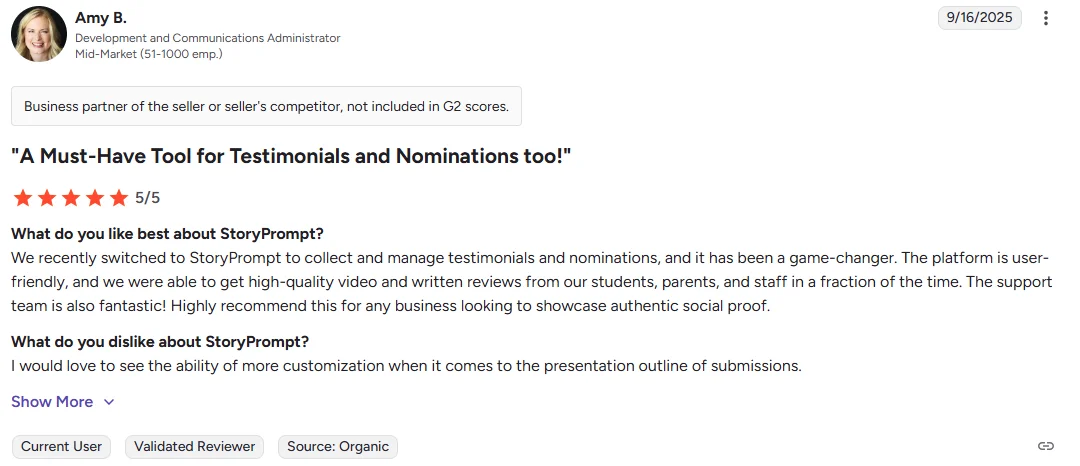
5. Reviewflowz

Most testimonial software aims to help you collect new reviews.
ReviewFlowz is built for businesses that are already getting great online reviews on 3rd-party review platforms (G2, Capterra, Google, etc.).
But has no easy way to get them onto its website. This is a niche, but critically important, tool for B2B SaaS.
ReviewFlowz testimonial collection

ReviewFlowz collects customer testimonials via a form. It also automatically imports testimonials from over 20 third-party sites.
This is a game-changer because the best social proof is often already out there.
This approach first funnels positive feedback to high-authority review platforms, then displays the results.
ReviewFlowz testimonial management

The dashboard is a central hub for all your online reviews. You can filter, tag, and organize reviews from multiple sources in one place.
The dashboard also shows analytics, including ratings over time, review velocity, and a breakdown of positive & negative reviews over time.
You can also set up Slack notifications for new reviews, turning customer feedback into a real-time team asset.
ReviewFlowz testimonial display

ReviewFlowz pricing

ReviewFlowz user reviews

All your testimonial in one place
Collect testimonial, manage every response, and display them where they matter most.
6. SimpleTestimonial

If you feel overwhelmed by features and want a simple, lightweight, reliable tool for text testimonials, SimpleTestimonial is your answer.
It is deliberately minimal, focusing on core functionality and speed.
SimpleTestimonial collection
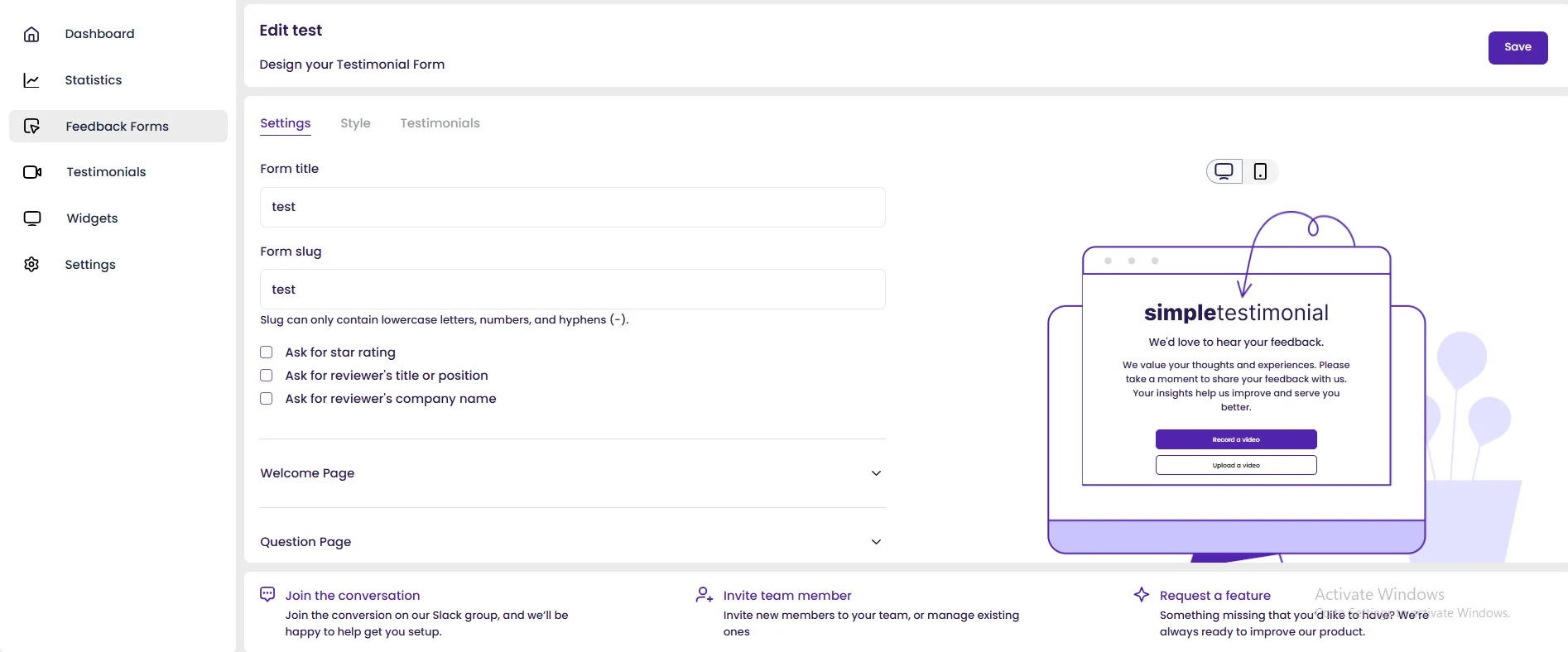
The collection form is exactly what it sounds like: simple. It allows customers to submit text and video testimonials through a streamlined, quick form.
You can choose what basic info to ask for (like star rating or company name). There are no complicated multi-step forms, just a clean way to collect text and photo-based positive feedback without the bloat.
SimpleTestimonial management

The dashboard is ultra-minimalist. You can easily approve submissions and organize them.
The main screen lets you preview your testimonials, including video testimonials, before you publish.
The lack of complex features means the learning curve is nearly zero, which is a huge benefit for small teams.
SimpleTestimonial display

The widgets are designed for speed and simplicity, offering a clean display of your customer feedback.
They look great out of the box with minimal customization options. You can choose which specific testimonial entries to include in your widget configurations.
This tool works well if you value site speed and simple integration over many widget styles.
SimpleTestimonial pricing

SimpleTestimonial G2 reviews

7. VocalVideo

When you absolutely, positively need high-quality, professional-looking testimonial videos without the expense of a film crew, you use VocalVideo.
This is not a budget option. It is the specialist tool for authentic video testimonials that look like they were produced in a studio.
The focus is exclusively on video, a significant difference from all-in-one tools.
VocalVideo testimonial collection

VocalVideo excels here by guiding the customer through a multi-step interview process. You use templates to set three to five key questions.
The tool then automatically prompts the user to record short, structured video clips. This makes the process easier for the customer and gives you structured feedback.
The result is raw footage of much higher quality than most other tools provide.
VocalVideo testimonial management

This is where VocalVideo shines. After the customer records, the tool automatically adds professional intro/outro screens, motion graphics, music (Soundtrack), and your branding (Brand Colors).
It’s almost a “done-for-you” video editing service. Automatic transcription is invaluable for repurposing clips into text testimonials and improving SEO.
You get polished, ready-to-share testimonial videos instantly.
VocalVideo testimonial display
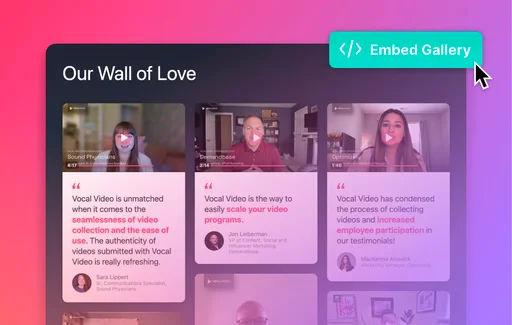
VocalVideo gives you simple, embeddable players designed to showcase your high-quality video testimonials.
You can embed widgets on your website or create a Wall of Love gallery, also called an Embed Gallery.
The player focuses on conversion and building trust, ensuring your high-investment video assets are displayed perfectly.
VocalVideo pricing

VocalVideo user reviews

8. MakeUGC

MakeUGC is a strong contender, particularly for e-commerce, because it excels at creating and managing User-Generated Content (UGC), including testimonial videos.
The key feature is the ability to turn a simple text prompt into a stunning, on-brand testimonial video.
MakeUGC testimonial creation
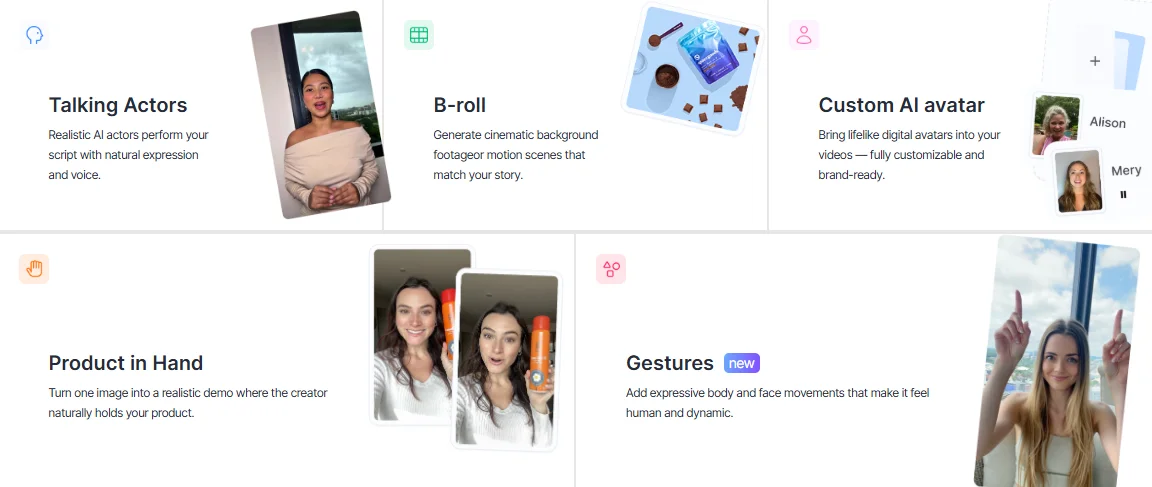
MakeUGC fundamentally changes the process of generating testimonial videos. Instead of waiting for a customer, you can use AI to create a high-quality video.
This includes:
- Talking Actors: Using realistic AI actors to perform a script based on a text testimonial with natural expression and voice.
- Product in Hand: Turning a simple image into a realistic demo where the actor holds your product, crucial social proof for e-commerce.
- Custom AI Avatar: Build digital versions of your own brand ambassadors or actors for fully customized, consistent content.
- B-roll: Generate cinematic background footage that matches the story, adding production quality easily.
MakeUGC pricing

MakeUGC user reviews

All your testimonial in one place
Collect testimonial, manage every response, and display them where they matter most.
Start Free →9. Famewall

Famewall is the better choice if your main goal is to create a visually impressive, dedicated page of social proof, the classic wall of love.
It focuses on aesthetics and on efficiently combining existing testimonials from social platforms with new submissions.
Famewall testimonial collection

Famewall provides an easy link for new submissions via a clean, dedicated collection page. You can customize the branding and colors to match your site.
The form makes it clear that customers can send text and video testimonials (or even audio), minimizing friction.
It also offers strong integration to automatically pull in positive feedback from X (Twitter), LinkedIn, and other social channels.
Famewall testimonial management
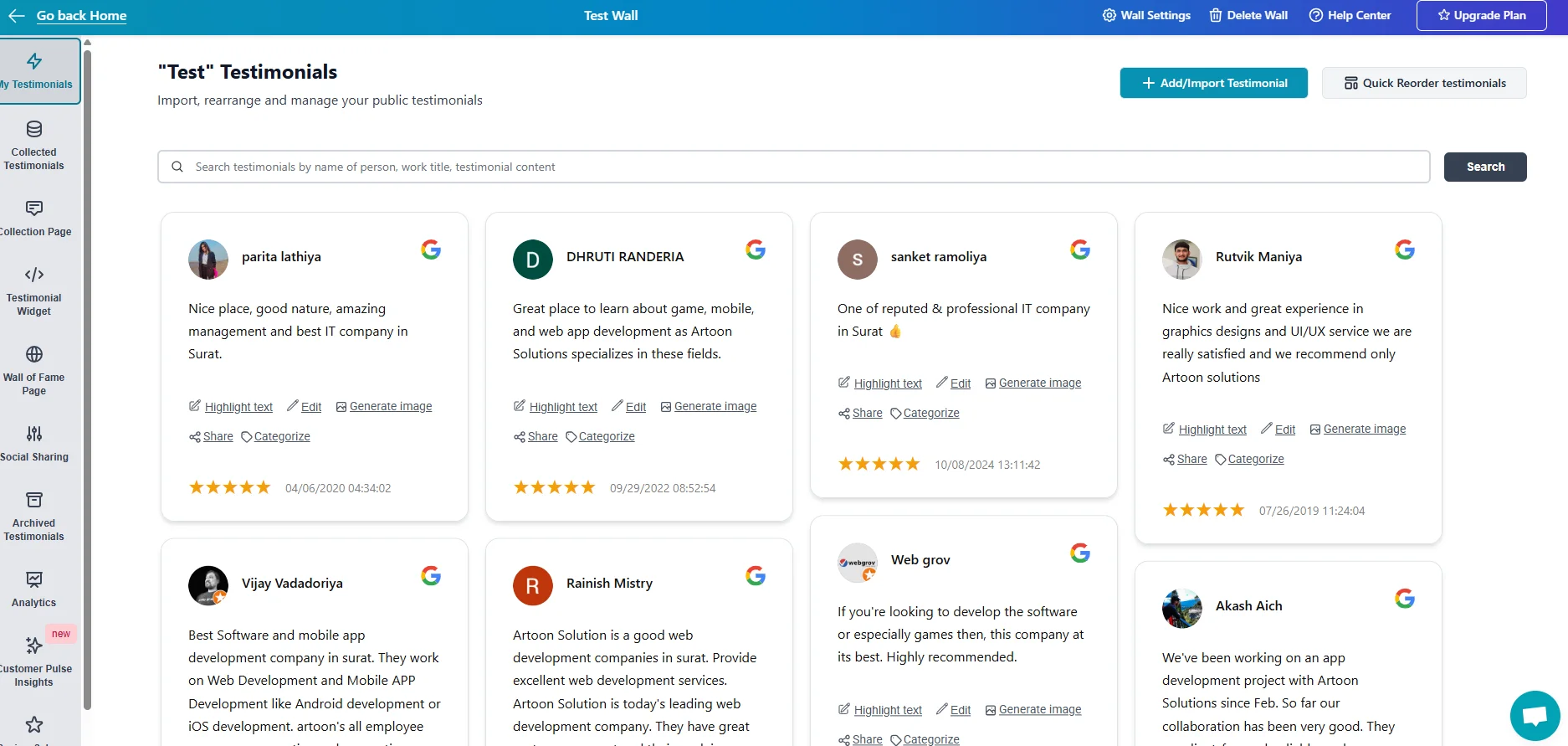
The system is built around organizing reviews into different “walls” or projects. This makes it incredibly easy to manage testimonials for different products, services, or brand campaigns.
You can import reviews, quickly rearrange them, highlight key text, and even generate image versions right from the dashboard, perfect for sharing testimonials on social media.
Famewall testimonial display

The primary display is the wall of love page itself, which is highly customizable.
You can choose from various design templates, like the “Grid with Gradient” or “Dark Gradient Wall,” ensuring the final display complements your brand style.
You can also embed widgets on your website, such as carousels and grids, but the focus remains on presenting a stunning, dedicated testimonial hero section.
Famewall pricing

Famewall user reviews

How to choose the right testimonial software
Picking the right tool becomes simple once you know what you need. Here’s the fast way to decide:
Choose based on your business type
| Business Type | Top Recommendation | Why? |
|---|---|---|
| SaaS/Agency | WiserReview or StoryPrompt | Need high-volume collection (WiserReview) and/or structured, long-form authentic video testimonials (StoryPrompt). |
| E-commerce/Physical Products | WiserReview or MakeUGC | Focus on photo/video UGC and on displaying product-specific online reviews to increase conversions. |
| Freelancer/Creator | Senja or Famewall | Prioritize speed, aesthetic simplicity, and the ability to convert text testimonials into social media assets quickly. |
| High-Volume 3rd Party Reviews (B2B) | ReviewFlowz | Your goal is to centralize and display testimonials from G2, Capterra, and other platforms. |
Choose based on the type of social proof you need
- If you need video testimonials, pick a video-first platform.
- If you only need text testimonials, choose a simple widget tool.
- If you need to import from multiple sources, pick tools that sync reviews automatically.
Choose based on budget and team size
| Scenario | Budget Guide | Best Fit |
|---|---|---|
| Solo / Startup (Free) | $0 – $10 / month | WiserReview (with a generous free plan) or Senja. Focus on a basic collection of text and a couple of videos. |
| Small Team / Scaling | $15 – $40 / month | WiserReview, Senja, UseTrust. This budget unlocks unlimited testimonials, basic Zapier integration, and core video features. |
| Mid-Market / Enterprise | $99+ / month | VocalVideo (for high-end video) or dedicated enterprise-focused solutions. You’ll get all the features like AI transcription, a custom domain, and multiple team members. |
How to get more testimonials (Even if you’re starting from Zero)
Testimonial software is just a tool. The actual skill is in the system you build around it.
Here are the evergreen principles for turning satisfied customers into powerful social proof.
1. Ask at the right time

This is the single most crucial action you can take. You are not asking for customer feedback when they buy something. You are asking at the “Wow!” moment.
- E-commerce: 7-14 days after delivery, when they’ve had time to use the product.
- SaaS: The moment a key “activation” metric is hit, when they log in for the 10th time, or complete a major project task. This often requires setting up in-app messages or automated emails.
- Agency/Consultant: Right after you deliver a major win (e.g., “Our traffic is up 30%!”) or at the final sign-off meeting.
Tip: Use your software’s integration, such as Zapier in WiserReview or UseTrust, to automatically trigger the request when that “Wow!” event occurs in your CRM or sales system.
2. Use incentives (Ethically)

There is a massive debate about incentivizing reviews. My rule is simple: You can incentivize the action (leaving a review), but not the result (a positive review).
- Bad: “Leave us a 5-star review and get a $50 gift card.” (Illegal/Unethical)
- Good: “We value your feedback. Click here to leave a review, positive or negative, and we’ll send you a coffee on us for your time.” (Ethical)
A small incentive like a $5 coffee card or a discount on their next purchase drastically increases the volume of positive feedback you receive. It makes the testimonial collection process feel like a genuine exchange.
3. Make it effortless

Your customers’ time matters. If the process of collecting feedback requires them to:
- Set up an account.
- Install an app.
- Answer 10 open-ended questions.
…you will fail.
The best testimonial collection software tools (like Senja, VocalVideo, or WiserReview) make the process as simple as clicking a single link and talking into their camera for 60 seconds.
The ability to collect video without a login is a must-have. Use interactive forms that guide them through the process.
4. Repurpose testimonials across marketing

A single testimonial shouldn’t just sit on a wall of love page. That’s passive.
You need to turn every piece of social proof into a highly targeted, active marketing asset.
- Turn Text Reviews into Visuals: Use your software (WiserReview, Senja, Famewall) to turn text testimonials into branded testimonial images and share them on social media and as paid ads.
- Use Video Clips Everywhere: Take a 15-second soundbite from an authentic video testimonial and use it in your email signature, retargeting ads, or your landing pages. This is why the auto-editing feature of a tool like VocalVideo is so valuable.
- Integrate into Sales: Your sales team should have a library of testimonial quotes and videos, tagged by use case or industry, ready to drop into a proposal or an email. This is how you build trust and shorten the sales cycle.
All your testimonial in one place
Collect testimonial, manage every response, and display them where they matter most.
Start Free →Wrap-Up
The ultimate goal of any successful business is to have other people do your selling for you. That’s the power of social proof.
If you still copy and paste text testimonials or try to edit your own shaky testimonial videos, you lose time and results.
In that case, you leave money on the table and sacrifice valuable time.
You need to pick the right testimonial software from the list above, with WiserReview as my top recommendation for the best all-in-one value, and commit to a consistent process for collecting authentic video testimonials.
Now put a system in place.
Frequently asked questions
Testimonial software helps you collect and show customer feedback in text, photo, or video form so you can build trust and increase conversions.
Small businesses often choose tools with low-cost plans and simple setup, such as WiserReview or platforms that offer strong free plans.
Yes. Many tools on the list support video testimonials, which help you show real customer stories with high trust value.
Most tools support Shopify, WooCommerce, WordPress, and custom sites. Some offer wider platform support than others.
Send clear requests, ask at the right time, and keep the form short. Tools with email, SMS, or WhatsApp reminders help increase response rates.

Krunal